> For the complete documentation index, see [llms.txt](https://docs.gemach.io/gemach-dao/llms.txt). Markdown versions of documentation pages are available by appending `.md` to page URLs; this page is available as [Markdown](https://docs.gemach.io/gemach-dao/products/gdex-pro/features/meme-scope-feature.md).
# Trenches
Trenches is the memecoin discovery board on GDEX Pro. It appears as **TRENCHES** in the top navigation; earlier documentation called it Meme Scope.
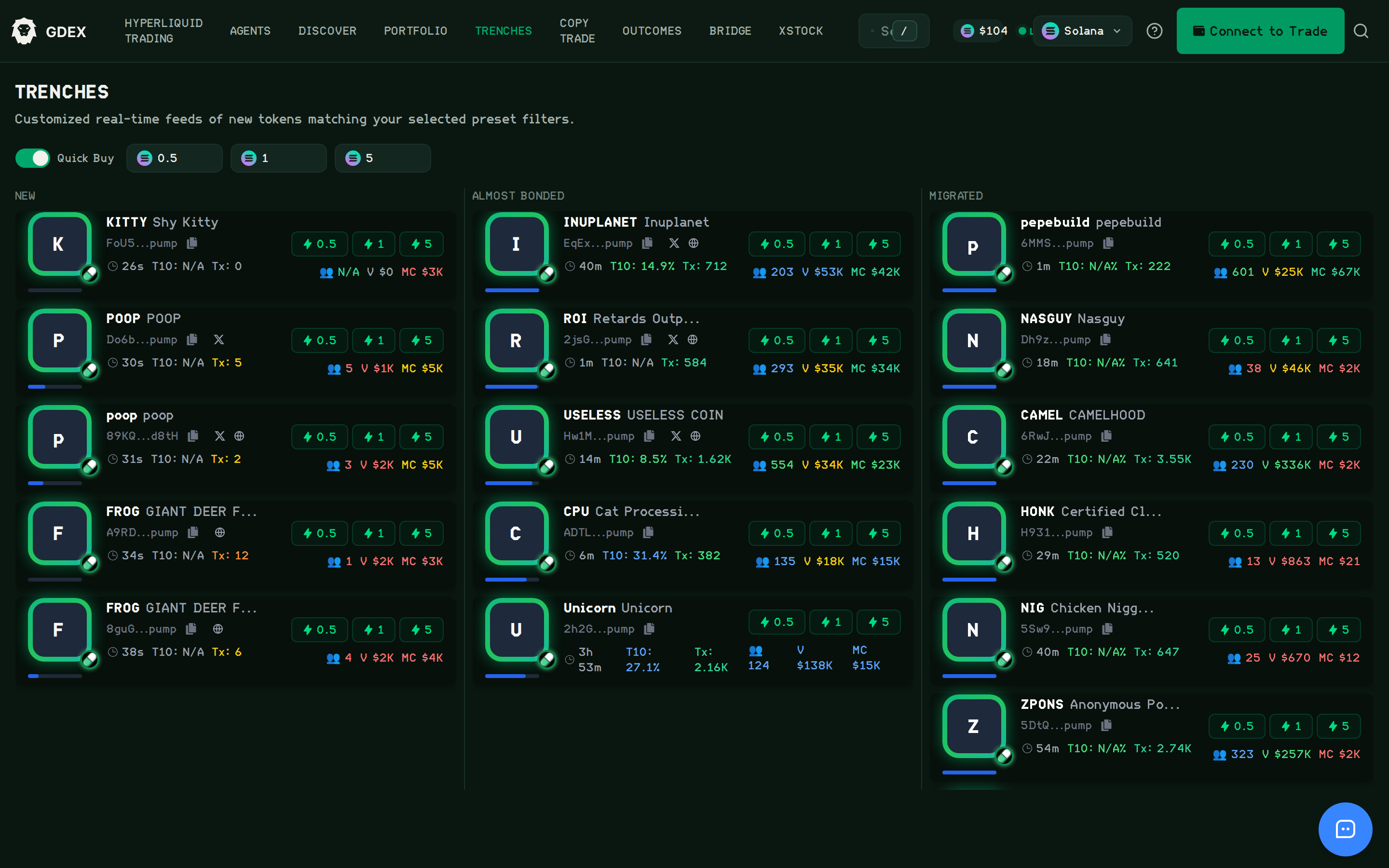
Trenches — New, Almost Bonded and Migrated feeds, each row with quick-buy amounts
## Watch (31 sec)
Trenches — New / Almost Bonded / Migrated feeds.
{% embed url="" %}
## How Trenches works
The Trenches feature on GDEX.pro provides customized real-time feeds of new tokens matching your selected preset filters, helping you stay on top of the latest trends and opportunities in the cryptocurrency market.
### Accessing the Trenches Feature
The Trenches feature is accessible from the main navigation menu at the top of the GDEX.pro interface. Simply click on "MEMESCOPE" to access this feature.
### Understanding the Trenches Interface
The Trenches page is designed to provide a customized feed of new tokens based on your preferences. The interface is divided into several key sections.
#### Key Elements of the Trenches Page
The Trenches page includes the following elements:
1. **Trenches Header**: Indicates you're viewing the Trenches feature
2. **Feature Description**: Explains that you're viewing customized real-time feeds of new tokens
3. **Quick Buy Toggle**: Option to enable or disable quick buying functionality
4. **Amount Presets**: Buttons to quickly select purchase amounts (0.5, 1, 5)
5. **Category Sections**: Different sections for token categories (e.g., "NEWLY CREATED", "ABOUT TO GRADUATE")
6. **Token Cards**: Individual cards displaying information about each token
### Using Trenches Filters
Trenches allows you to filter tokens based on various criteria to customize your feed:
#### Quick Buy Filter
Toggle the "Quick Buy" option to show only tokens that are available for immediate purchase through GDEX.pro.
#### Amount Presets
Select from preset amounts (0.5, 1, 5) to quickly set your preferred purchase amount when using the Quick Buy feature.
### Understanding Token Categories
Trenches organizes tokens into different categories to help you find opportunities that match your interests:
#### Newly Created
This section displays tokens that have been recently created or listed. These are often the newest opportunities in the market but may come with higher risk.
#### About to Graduate
This section shows tokens that have met certain criteria and are about to "graduate" to a more established status. These may represent tokens that have proven some initial stability or growth.
### Token Card Information
Each token card in Trenches provides detailed information to help you evaluate potential opportunities:
#### Token Identification
* **Token Symbol**: The abbreviated code representing the token
* **Token Name**: The full name of the token
* **Token Icon**: Visual representation of the token
#### Token Metrics
* **Time Since Creation**: How long the token has been available
* **Price Information**: Current price and price change indicators
* **Market Metrics**: Information about market cap, liquidity, and volume
* **Quick Buy Buttons**: Options to quickly purchase the token in preset amounts
### Using Quick Buy
The Quick Buy feature allows you to quickly purchase tokens directly from the Trenches interface:
1. Enable the Quick Buy toggle at the top of the page
2. Browse tokens in your customized feed
3. Select a preset amount (0.5, 1, or 5) or enter a custom amount
4. Click the Quick Buy button on the token card
5. Confirm the transaction in your wallet
### Best Practices for Using Trenches
To make the most of the Trenches feature:
1. **Set Clear Criteria**: Use filters to focus on tokens that match your investment strategy
2. **Regular Monitoring**: Check Trenches regularly to catch new opportunities
3. **Research Further**: Use Trenches as a starting point, but conduct additional research before investing
4. **Start Small**: When trying new tokens discovered through Trenches, consider starting with smaller investments
5. **Compare Categories**: Look at tokens across different categories to understand market trends
### Connecting Your Wallet
To fully utilize the Trenches feature, including Quick Buy functionality, you'll need to connect your wallet to GDEX.pro. Refer to the Getting Started section for instructions on connecting your wallet.
The Trenches feature provides a powerful way to discover new tokens and stay ahead of market trends, giving you early access to potential opportunities in the fast-moving cryptocurrency space.